Forum Moderators: rogerd & travelin cat
Message Too Old, No Replies
Improving First Contentful Paint with wordpress

Looking for hint tips, themes, plugins, hosting options et al to speed up My First Contentful Paint requirements in the new Google Cor Web Vitals that will start taking place next year
Any advice would be helpful
Like is word press hosting any faster than cpanel hosting
Which is the best caching plugin
et al


Hosting on WordPress dot com itself comes with CloudFlare's free caching service that dramatically speeds up site delivery because it's delivering a static cache that doesn't hit the origin server.
It's a new service though and a few people have reported some bugs. So it might be easier to spring for the $5/month plan instead of moving to WordPress, that way you can test it out with the least disruption.
Good luck!
Roger Montti

Quite a few things can go into your FCP, so the first step is always to figure out in more detail why your FCP needs improvement. The PageSpeed Insights tool, for example, will tell you this, and give you pointers on how to improve. If your server responds slowly to requests, i.e. a long TTFB, you could look into WordPress caching and perhaps better web hosting. If it's a lot of render-blocking javascript or css, you'll have to adjust your WordPress theme accordingly. And so forth.
As for cPanel hosting vs. WordPress hosting, things aren't generally that black and white there either. WordPress hosting suggests the server is optimized to run WordPress, but too many other factors are in play so that cPanel hosting can still outperform WordPress hosting. Mostly they're just marketing terms. And there isn't really any one "best" caching plug-in, they all do pretty much the same thing. I only have experience with W3TC, and it works just fine. There are lots of tutorials that will guide you through configuring such plug-ins, and improving WordPress performance generally.
Hosting on WordPress dot com itself comes with CloudFlare's free caching service that dramatically speeds up site delivery because it's delivering a static cache that doesn't hit the origin server.
This is now also available as a WordPress plug-in, I believe.
This is now also available as a WordPress plug-in, I believe.
Right. That's correct.
As I understand it, installing the plugin will take the publisher to Cloudflare where they can sign up for the free plan plus the $5 monthly fee, unless they're already a pro or business level customer, which makes it free.
Hello,
The problem with CMS is that you do not really have a control of their behavior (excepting if you develop your own CMS, of-course).
Wordpress is a huge and heavy thing and not the best choice, when you try to achieve fast pages. Also, the more you add plug-ins, the more you are slowing the pages. So just select the plug-ins you really need, and avoid too much extra stuff.
By the way, cache is important.
Good host connectivity.
Good server hardware. Avoid bloating shared host. A VPS or dedicated server, can be a good investment. The more RAM, the higher will be the performances.
Latest PHP 7 version. (don't use the 5.x branch anymore).
LiteSpeed Web Server (software), for optimal PHP's performances.
I've used a few different caching plugins and they are all pretty similar in features and functionality (what I look for is that they are highly rated and widely-used because popularity basically ensures they will be tested and updated for compatibility with new versions of WordPress and that any security vulnerabilities are likely to be patched quickly after being reported) and they typically handle concatenation, minification, compression and setting expiration headers for static assets...all of which are important.
Assuming all of that is handled already (and that your time to first byte is good etc.), you want to make sure CSS loads before JS. Ideally, CSS in the `head` of the page and JS at the bottom (if JS can't be at the bottom, you at least want it after the CSS, otherwise the JS will block the downloading, parsing and rendering of the styles, which is the 'Contentful Paint').
If you 'inline critical CSS' that particularly helps speed up the 'First Contenful Paint' because the rendering engine doesn't have to wait for any external files to load to start calculating the appearance of the page.
Caching plugins often handle these 2 settings as well.
The other 2 things that help quite a bit but are more involved are:
- Using a reverse proxy (Nginx) in front of your server (Apache) to serve static assets (I use a WHM plugin called Engintron that handles this automatically for all my cPanel sites) or offloading static assets to a CDN.[/li]
- Making sure your CSS is efficient (that it avoids overqualified selectors, unneeded styles, duplicate rules, conflicting styles, etc.). There are several tools I use to test my CSS and often automate optimizing it but the easiest one to get started with is probably CSS Lint.[/li]
Using a reverse proxy (Nginx) in front of your server (Apache)
Then, why not use Nginx only right away?
Thanks for all the input.
Update
I found four things that helped me get my good page speed up in the high 90's and FCP LCP and blocking time all in the green
1. I reviewed all my plug ins and decided what I really needed and what as just there fancy and glitzy. I got rid of that, and simplified my site (while keeping all content, pictures and navigation) ."Light Weight Slider" is a nice light weight slider that did not add a lot of weight so I kept it , not a lot of functionality, but images and links as all I needed - 35% improvement
2 Reviewed a multiplicity of caching plugins , Minimizing (js/css/html) and found the more popular ones, while they did the job added their own weight. The one I settled on was Autoptimize seems to a good job on all fronts, I suggest using the add on plug in Async Javascript (as always be careful moving Jquery as it can screw up the above content are 0menus/headers) and autoclear for autoptomize. 30% improvement
3 Researched and ran through a lot of themes looking for something truly light weight. and found generatepress to be the best theme for what I was looking for (Had to tweek woocommerce to get the results i wanted) to utilize GP you really should consider the $40.00 upgrade, much more customizable. 20% improvement
4 Switched from Shared to Virtual Private Server, (Private servers are out of my price range right now) 15% improvement
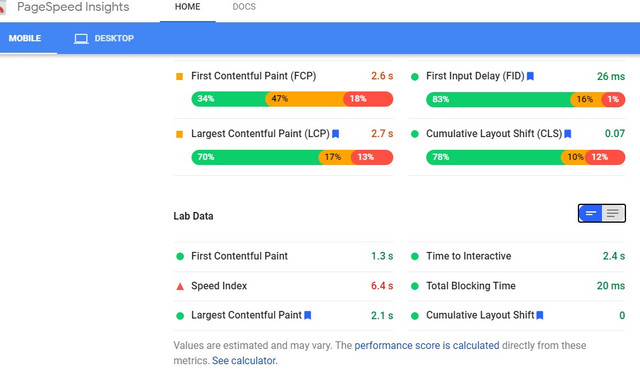 [ibb.co]
 Not sure what I can do with the speed index. I need to show my product. I'll try the cloud image hosting
Join The Conversation
- Register For Free! - Become a Pro Member!
- See forum categories - Enter the Forum
Moderators and Top Contributors
- Moderator List | Top Contributors:This Week, This Month, Aug, Jul, Archive, Top 100 All Time, Top Voted Members
Hot Threads This Week
