Forum Moderators: open
Message Too Old, No Replies
How to redirect for non-www canonical in web.config?

https://example.com vs https://www.example.com
I tried to force redirect all www to non-www urls from htaccess file (server side) but not solving the issue
Google keeps chose different canonical than user instead of the rendered page is rel="canonical" is the same as url which is self-canonical (https://www.example.com)
I don't know if there is some points missing
thanks in advanced


We would need to know what you have in your .htaccess file to redirect. If we know what you have there, you can get suggestions to make it work the way you want.
RewriteEngine On
RewriteCond %{HTTP_HOST} ^www.example.com [NC]
RewriteRule ^(.*)$ https://example.com/$1 [L,R=301]
I'm sorry its not htaccess, according to the sever type its web.config
screenshot from the implemented code
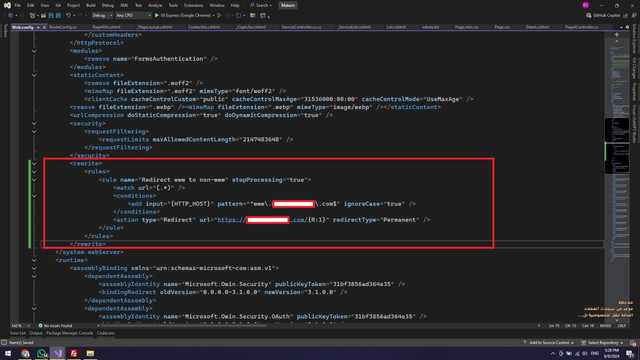 [ibb.co]
 [edited by: not2easy at 7:38 pm (utc) on Sep 14, 2024]
[edit reason] img visibility [/edit]
i really appreciate that, thank you
I'm a little bit confused for the issue and I'm missing a lot of points to consider in the first message
I'm trying to find a reason why your screenshot does not load after moving the discussion to the IIS Forum. I'll try again to see what has changed.
Finally got something to show here. Sorry for the delay.

But, but, but...
RewriteEngine On
RewriteCond %{HTTP_HOST} ^www.example.com [NC]
RewriteRule ^(.*)$ https://example.com/$1 [L,R=301]The first thing to make sure of is that the coded canonicalization redirect is actually happening. You can test this easily in your browser by requesting various pages with the “wrong” form of hostname, and checking that you end up on the preferred form.
@lucy24 - The screenshot and the post preceding it told me to move the discussion from the Apache forum to the IIS forum.
You can test this easily in your browser by requesting various pages with the “wrong” form of hostname, and checking that you end up on the preferred form.Yes, then look at your logs to be sure there are no multiple redirects. When you request https://www.example.com/page.html your logs should show a 301 response and then a 200 response for https://example.com/page.html
There are some old instructions (from 2008) that explain how to redirect: [webmasterworld.com...]
- to paraphrase from that thread:
The way to do that is create a new separate website entry and then on the "Home Directory" tabI can't tell you whether that is accurate current information, but you should be able to ask the host how to set it up.
Select A redirection to A URL
https://example.com
And tick A permanent redirection for this resource.
Join The Conversation
- Register For Free! - Become a Pro Member!
- See forum categories - Enter the Forum
Moderators and Top Contributors
- Moderator List | Top Contributors:This Week, This Month, Aug, Jul, Archive, Top 100 All Time, Top Voted Members
Hot Threads This Week
