Forum Moderators: open
Message Too Old, No Replies
Chrome 82 to Start Warning and Blocking "Mixed Content Downloads"


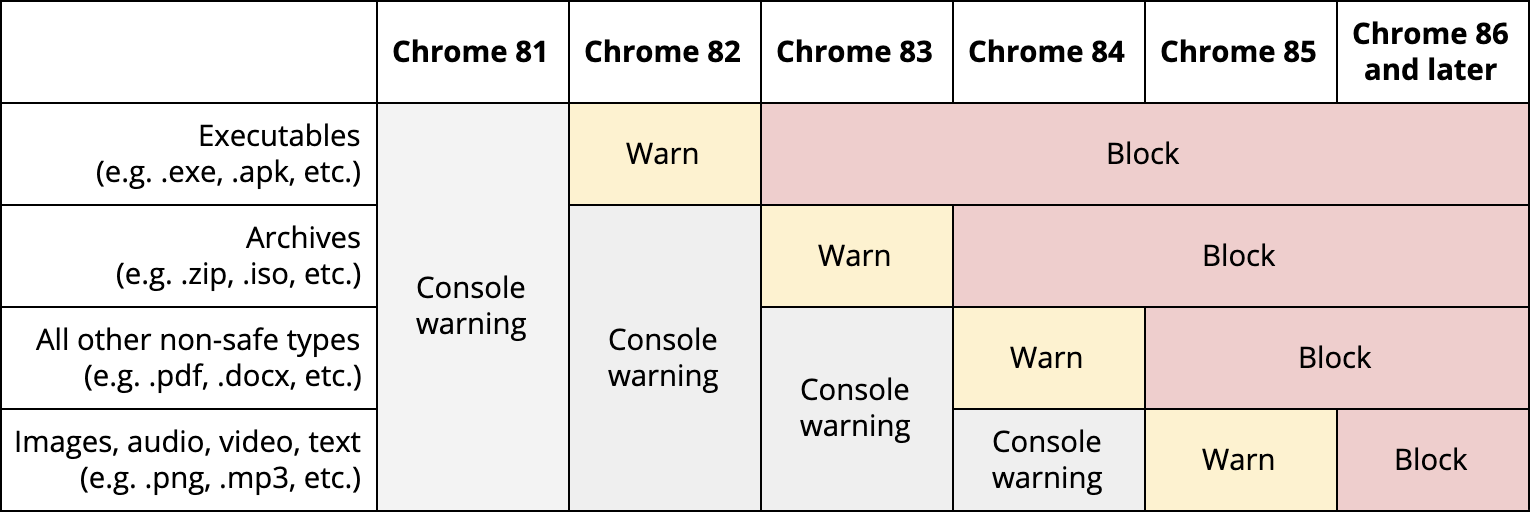
Google has said Chrome 82 will start blocking "mixed content downloads" to protect users from insecure files being downloaded from HTTPS sites.
In other words, on an HTTPS site, non-HTTPS downloads will be blocked with V82, due April, 2020.
It's going to be a gradual rollout, starting with a console warning in V81, with warning over .exe downloads in V82, and blocking from V84. Android and iOS users will be delayed by one release as, it says, the mobile OS has better native protection.
[security.googleblog.com...]

Adsense is the one trying to load an insecure imageWell, this is not the first time we have come across “Do as we say, not as we do.”
@csdude Are you sure about that? yimg.com is a Yahoo domain. Why would Adsense be loading an image from there?

Adsense is loading files (image, js, etc...) from other domains too, this is a big soup. Also, when third parties ad networks enter the game, files are coming from everywhere. If you look at the network activity, with any web dev tool, this is a firework.
@dimitri, probably why, but what a third party network does is not Google's fault.
This may not be the place to post this, but...
I don't exactly know what's going on with http/https, but I just updated my site, have valid certificates, and put in the rewrites in .htacces properly. I am getting redirects on all my pages now showing up as https. In Safari, NO PROBLEMO. In chrome, I get a big warning NOT SECURE sign and the https has a red line through it.
I mean, this is all Google's doing, WTF is wrong with these people?
I'll probably get no ad clicks tomorrow because I did what they want me to do. It's infuriating.
Hey, I fixed it, with some help from my web hosting company's tech dept.
Google must be broken up. Justice Dept.'s anti-trust division needs to get its act together.
You hate him. Good. Then the time has come for you to take the last step. You must love Big Brother. It is not enough to obey him: you must love him.
In chrome, I get a big warning NOT SECURE sign and the https has a red line through it.
Hey, I fixed it, with some help from my web hosting company's tech dept.
So after all, was it Google chrome broken? or a problem on the installation of the cert / host? It's not because one browser (safari, here), says one thing, that it means that all other browsers have to say the same.
When you see an "error/warning" related to a secure connection, you just have to review what the Browser is complaining about. You always have a detail, or get more information button, which lists exactly what the problem is.
You always have a detail, or get more information button, which lists exactly what the problem is.Does there exist any solid information on how users deal with this kind of warning? Typically there are three options: abandon the site, charge on regardless, or ask the browser to tell you more. In real life, what do people do? I mean, of course, ordinary humans, not WebmasterWorld readers.
This 39 message thread spans 2 pages: 39
Join The Conversation
- Register For Free! - Become a Pro Member!
- See forum categories - Enter the Forum
Moderators and Top Contributors
- Moderator List | Top Contributors:This Week, This Month, Aug, Jul, Archive, Top 100 All Time, Top Voted Members
Hot Threads This Week
