Forum Moderators: open
Message Too Old, No Replies
 Google Chrome Will Mark HTTP Sites Transmitting Passwords or Credit Cards as Non Secure


From January 2017, Google Chrome is going to mark HTTP sites that communicate passwords and or credit card info as non-secure.
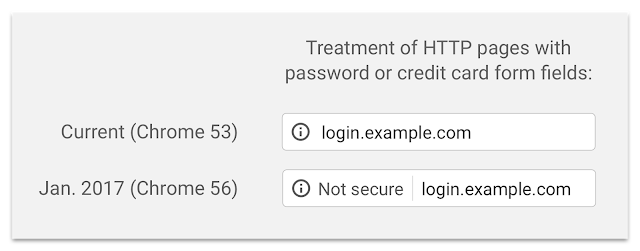
Studies show that users do not perceive the lack of a “secure” icon as a warning, but also that users become blind to warnings that occur too frequently. Our plan to label HTTP sites more clearly and accurately as non-secure will take place in gradual steps, based on increasingly stringent criteria. Starting January 2017, Chrome 56 will label HTTP pages with password or credit card form fields as "not secure," given their particularly sensitive nature.Google Chrome Will Mark HTTP Sites Transmitting Passwords or Credit Cards as Non Secure [security.googleblog.com]
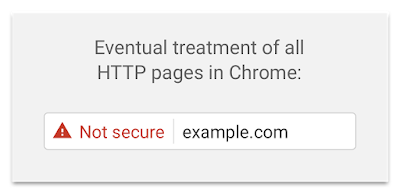

Some of the commentary headlines out there make it seem like this is Google pushing all sites to have HTTPS on all of their pages. Sending password credentials really should be done over a secure connection, so I doubt many will have issues with this.
It does fix the peculiarity that the average user is quite happy to type their password into an http page, but not into an https page that has an invalid certificate.
It is also possible that there are enough sites out there that accept passwords over http for users to become blind to this.

Recent chrome builds have started showing a fairly large warning whenever you submit anything over a non-secure connection. I ended up moving all my sites to https just to avoid this. Realistically there is no reason not to use https now.
Mack.
You moved the entire sites, or just the form submission areas?
I moved the entire sites to HTTPS. Probably not a must for now, but for me it made sense. I feel it is something we all need to do, so decided to bite the bullet and just go for it. In fairness, the entire process took less than an hour and I have seen no adverse traffic effects. I have forms on many pages, so for the end user, it makes sense to secure the site.
Mack.
I've been toying with the idea for several sites on shared hosting as a lot of the cPanel installs are starting to incorporate Let's Encrypt free certs. On my larger established sites on dedicated servers would involve a lot more work to fully switch over. However on those I've always has the forms on HTTPS anyway, so this change in Chrome isn't going to impact me either way.
A bit more work on dedicated boxes, but for sites on shared hosting it's really just a few clicks.
Mack.
1. The most connection errors and timeouts I get are from https pages, specially on slow connections and on my mobile!
2. https pages are very error sensitive, you only need to have 1 (external) file on http and the browser tells you that the page is insecure! For sure that there are many persons who are not going to trust that, and no submit any info!
3. If you are having adsense on your site,... I would think twice before I go to https. Many people have report big adsense losses when turning to https (from 20% to 70% loss). Mostly because many advertisers are not https prepared. This is for me the most important reason not to use https.
And now there are so many sites that use https, and on the same moment they put all kind of external widget (most are data-mining widgets what is my eyes spy-ware) and external analytics programs on their sites. Why secure your site if you give all the information to 3th parties who are going to abuse that!
And I did not forget google saying that we need to have our sites mobile friendly, or we are going to lose a lot of traffic. So I have been spending 1 month to make all my pages, and especially my programs mobile friendly. With the great result that my mobile traffic is still the same (5%), and a loss of 30% of desktop traffic because of the loss of search-engine rankings. And that only because google wanted a bigger mobile friendly database.
I go to https when I think its time for it, not because google wants it! And especially not when google forge me to do so!
I - probably - have no bone in this any more as I switched to HTTP/2 (with fallback to HTTP/1.1) two months ago.
The initial (January-2017) emphasis of bringing up the 'non-secure' from under the 'i' info icon for credit card takers! - really? - is obviously way way overdue; personally I'd plaster the page with a pop-up! Including simple non-secure log-in pages is OK if not as problematic.
The real kicker is the mention that somewhen down the line all HTTP connections will be brightly labelled as non-secure. This is not really necessary from a security/privacy rationale unless one is particularly paranoid; it is however, a good way to give a boot in the rear assist to move folks from HTTP/1.1 to HTTP/2 when that is considered sufficiently beneficial with regards to bandwidth, connectivity, and render speed.
For those not aware of the change some browsers have already replaced address bar favicons with either the 'lock' icon of a secure connection or an 'i' info icon. In FF:
* hovering the 'i' icon displays: 'show site information'.
* clicking displays: www.example.com
and in red: Connection is not Secure
* clicking the associated arrow displays: [ the foregoing plus ] Your connection to this site is not private. Information you submit could be viewed by others (like passwords, messages, credit cards, etc.).
The push to HTTPS is here a nudge, there a wink. And in January, a shot across the bow.
And may it not hit you as it is currently bludgeoning Target and Macy's:
Your connection is not secure

The owner of [ target.com | macys.com ] has configured their website improperly. To protect your information from being stolen, Firefox has not connected to this website.
...
[ target.com | macys.com ] uses an invalid security certificate. The certificate is only valid for the following names: a248.e.akamai.net, *.akamaized.net, *.akamaihd-staging.net, *.akamaihd.net, *.akamaized-staging.net
Oops.
redhat
The following message was cut out to new thread by engine. New thread at: google_chrome/4818986.htm [webmasterworld.com]
12:23 pm on Sep 19, 2016 (utc +1)
As promised for January 2017, Google's Chrome desktop browser now displays either the green Secure and the lock icon for secure web sites or the gray circle info icon in the address bar for non-secure web sites.
Google's Chrome mobile browser displays the green lock and https for secure sites and just the www... for non-secure sites.
Google & Bing SERP have been displaying the site URLs as https:/www... for secure sites and just www.... for non-secure sites for several weeks.
So it has begun. Wonder when the next phase with the red warning will begin?
The icons are explained here: [support.google.com...]
Got a message in Google Search Console yesterday saying Google will mark pages that collect passwords or credit card details as “Not Secure” unless the pages are served over HTTPS. It says 'beginning in Jan 2017' while it only arrived yesterday and there was this active thread on Webmasterworld from Sep. So, just wondering if anybody got such a message and noticed the warning live in Chrome. Here's the screenshot of the message - [screencast.com...]
So, do you think this Chrome warning will be an overlay window like the one Chrome displays on malicious URLs currently or it will just add 'x' mark in the address bar on the left? Thanks!
shaunm, look for youself it's been live for a couple weeks (see my post above yours.)
There wiil be several stages of implementation, eventually showing warnings for all sites not HTTPS.
also note this more recent thread.
Nonsecure Collection of Passwords will trigger warnings in Chrome 56 - Webmaster General forum at WebmasterWorld:
https://www.webmasterworld.com/webmaster/4830145.htm [webmasterworld.com]
Thanks @keyplyr
So, this round info icon at the beginning of my URL in address bar, is that the warning? What's the next phase of updates includes, an overlay window blocking the view?!
Edit:
Wasn't the round info icon there all the time on all http sites, no matter whether it includes password fields or not?! I'm confused.
As discussed earlier, eventually all sites not HTTPS will get a not-secure warning... the red triangle.
Links explained here: [support.google.com...]
eventually all sites not HTTPS will get a not-secure warning... the red triangle.Is that really the case for all HTTP sites or the ones with password fields? I don't really see a reason for Chrome to display the red triangle on HTTP sites that doesn't have any input fields?!
Starting with password sites but eventually all sites
This is what Google has said. They are championing the push to make all sites on the inteternet secure.
.
Just correct me if I'm wrong. There are four types of address bar notifications that Google is planning to push or has been doing already from the Google link you shared.
Secure - Green Lock Icon: HTTPS site with all HTTPS external links
Info - Gray Round Info Icon: HTTP sites without input fields
Not Secure - Red Triangle Icon: HTTP sites with input fields
Dangerous - Red Triangle Icon: HTTP (Or even HTTPS) sites found to be malicious which might also include an input field
This how I perceived and I know I can be entirely wrong. But, why should there be an 'Info Icon' if it's going to mark everything with a Red Triangle on the Google link? Thanks for the clarifications. Much appreciate!
As previously discussed, all this will come in stages. We are in the 1st stage. Things will change.
Only Google knows what icons will stay and what icons will be temporary. No other info is available at this time AFAIK.
Found this at Google Developers Groups:
Long term - Use HTTPS everywhere
Eventually, Chrome will show a Not Secure warning for all pages served over HTTP, regardless of whether or not the page contains sensitive input fields. Even if you adopt one of the more targeted resolutions above, you should plan to migrate your site to use HTTPS for all pages.
[developers.google.com...]
Thanks. Not so happy to hear that. It made sense when it displayed the not secure warning on https pages with http links on it though.
Join The Conversation
- Register For Free! - Become a Pro Member!
- See forum categories - Enter the Forum
Moderators and Top Contributors
- Moderator List | Top Contributors:This Week, This Month, Aug, Jul, Archive, Top 100 All Time, Top Voted Members
Hot Threads This Week
